See Every Competitor’s Metadata and Reputation in Single Dashboard
- Overview:
- The Challenge of App Research in Mobile Marketing
- Introducing App Profile and Ratings & Reviews
- App Profile: Core Interface and Data Points
- Ratings & Reviews: Core Interface and Data Points
- Expanding Your Free ASO Toolkit
- Practical Workflows for Growth Teams
- Conclusion
Competitor research usually means five browser tabs, three paid subscriptions, and hours pulling data by hand. Keyapp closes that gap with two free dashboard tools built for exactly this job: App Profile and Ratings & Reviews.
Both tools live inside the same account, with no extra cost and no separate login required. App Profile gives you the full public listing for any competitor on Google Play or the App Store, and Ratings & Reviews breaks that app’s reputation down by country and by day. Together they turn scattered app store data into one clean screen your team can act on the same day you open it.
The Challenge of App Research in Mobile Marketing
Most ASO teams check five or six sources before making one decision about a competitor’s app. A metadata scraper here, a review export there, a spreadsheet built by hand to tie it all together. Each of those point tools charges its own subscription fee. Add them up across a quarter, and the bill for basic competitor visibility can rival the cost of a small paid user acquisition test.
The problem gets worse for teams tracking apps across several countries. Rating averages on a store listing page hide exactly where sentiment is strong and where it is falling apart, so teams either skip that analysis or pay for a specialized tool just to see it.
Introducing App Profile and Ratings & Reviews
Keyapp built two dashboard tools to remove that friction directly. App Profile covers metadata, visual assets, and category positioning for any app. Ratings & Reviews covers reputation, sentiment history, and localized rating gaps for the same app. For a full walkthrough of both tools’ interfaces, watch our video guide.
Both are free inside your Keyapp account, with no usage cap and no upsell wall blocking the data described in this article. You can create a free account and open both tools right now, and registration takes under a minute.
App Profile: Core Interface and Data Points
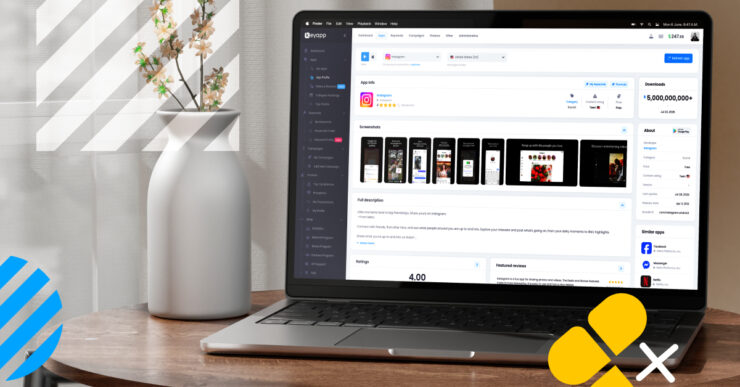
App Profile pulls the full public record for any app into a single view. Search any app by name, pick Google Play or the App Store, and the dashboard loads its complete listing.
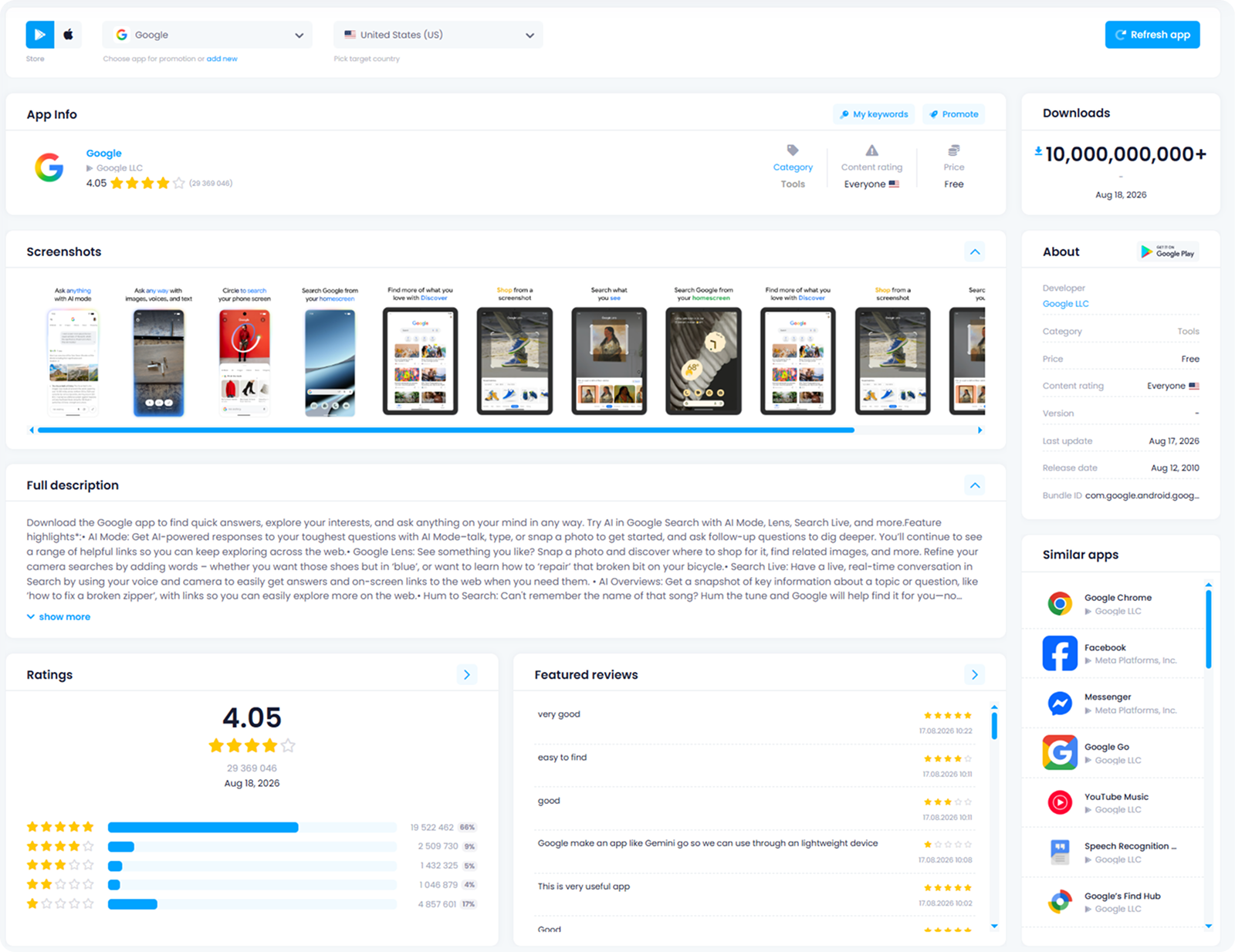
- Store and Platform Selection. Switch between Google Play and the App Store from the same search bar, and target a specific country to see how a listing appears to users in that market. Pricing, content ratings, and even screenshot sets can differ by country, so this toggle matters for any global competitor check.
- Metadata and Listing Overview. The main panel shows title, icon, developer name, category, content rating, download count, and last update date at a glance. The full description loads underneath with its original keyword-rich phrasing intact, which is what you actually want to study for ASO purposes.
- Screenshot and Visual Asset Review. A horizontal carousel displays every screenshot the app currently uses in the store, in the exact order shoppers see them. Comparing screenshot sequences across three or four competitors quickly reveals a pattern in how the category presents its core features.
- Similar Apps and Competitive Mapping. A dedicated panel lists the apps the store itself treats as direct competition, alongside a summary of the app’s rating and a handful of featured reviews. This is a fast way to confirm your real competitive set, which is not always the list you would guess from memory.
Ratings & Reviews: Core Interface and Data Points
Ratings & Reviews goes deeper than the single star average shown on any store page. It breaks sentiment down by geography and by time, so your team can see exactly where a rating problem started.
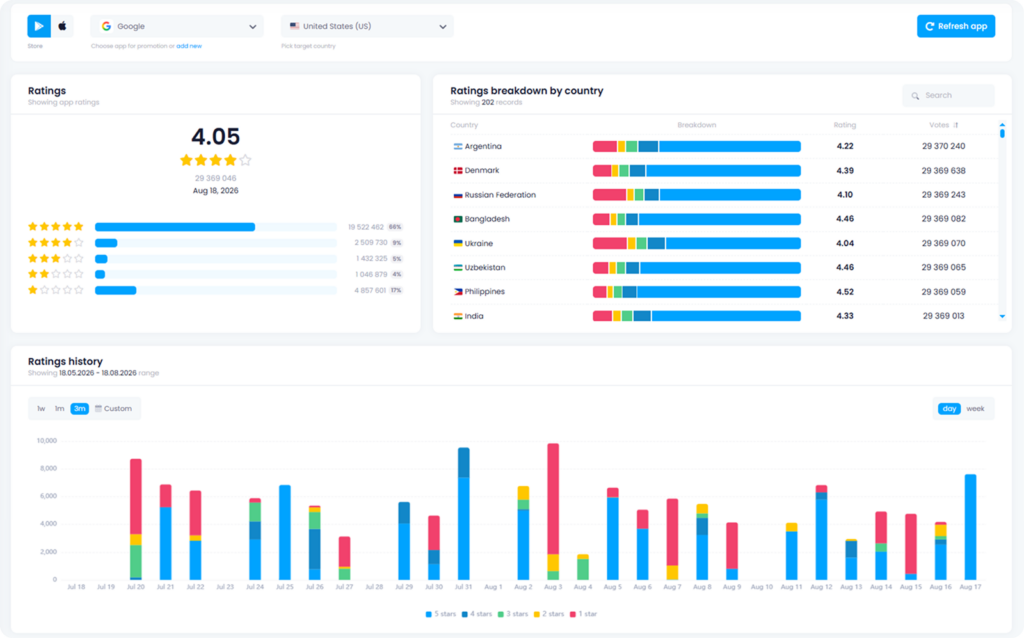
- Country by Country Rating Breakdown. A sortable table lists every country with meaningful vote volume, showing a country-specific rating and total vote count next to a color-coded breakdown bar. A market sitting well below the global average is usually the first sign of a localization issue worth investigating.
- Historical Rating Charts. A chart plots rating volume by day or by week, split into five colored segments for five-star through one-star reviews. Custom date ranges let you isolate the days around a release and confirm whether a new build caused a spike in negative reviews.
- Deep Review Search and Filtering. The review feed can be filtered by star rating and sorted by relevance or recency, with a search bar for finding specific phrases across thousands of entries. This view also surfaces App Store reviews that are hard to browse through a normal web interface.
- AI Generated Review Responses. A built-in AI Generator tab drafts review responses at volume, giving support and marketing teams a starting point instead of a blank text box for every entry.
Expanding Your Free ASO Toolkit
App Profile and Ratings & Reviews sit alongside the rest of Keyapp’s free research tools and are designed to be used synergistically rather than in isolation. Pull a competitor’s metadata in App Profile, and then check how that same competitor’s rating holds up by country in Ratings & Reviews.
We covered adjacent automation methods in the earlier articles on free AI tools for ASO and Top Mobile Apps Charts. Use AI generation to draft your own listing, check App Profile to see how top competitors phrase similar benefits, and finally use Ratings & Reviews to confirm their reputation actually backs up their claims.
Practical Workflows for Growth Teams
These tools are built to answer the specific questions your team already asks every week. The four workflows below combine App Profile and Ratings & Reviews without requiring you to leave the dashboard.
1. Pre-Launch Competitive Benchmarking
Before a launch, search for each direct competitor in App Profile within your target category and country. Record their screenshot count, description length, and keyword placement in the first 160 characters. Check the similar apps panel to confirm your competitive set matches what the store surfaces. Then, cross-reference with Ratings & Reviews to identify which competitors carry unresolved complaints that your own listing can address directly.
2. Metadata Audits Against Top Competitors
Pull your own App Profile and compare it side-by-side against your top three competitors. Flag gaps such as missing screenshots, thin descriptions, or an icon that looks dated compared to category norms, and note which keywords appear in competitor descriptions but are missing from yours.
3. Localized Reputation Monitoring
Sort the country breakdown in Ratings & Reviews by rating (lowest first), and investigate any country sitting more than 0.3 points below your global average. Filter the review feed for that specific country and read the actual complaints rather than relying on the star count alone. Then, use the AI Generator to draft a response, adjusting it for local tone before publishing.
4. Bridging the Gap Between Research and Promotion
Research alone does not move an app up the charts; its true value lies in feeding insights directly into your upcoming campaigns. A metadata gap spotted in App Profile can be tested alongside a keyword install campaign for the terms your competitor is missing. Similarly, a localization problem identified in Ratings & Reviews reveals a prime target market for a category install push once the underlying issue is resolved. Finally, a pattern of specific complaints can serve as the brief for a targeted review campaign, helping you collect positive feedback where it is currently thin.
Conclusion
Centralized data shortens the distance between a question and a decision. Instead of stitching together exports from four separate services, your team can open a single dashboard to find direct answers.
App Profile and Ratings & Reviews are free tools to every Keyapp account, featuring no expiring trial periods, no seat limits, and no paywalls hiding the data covered in this article. Create your free Keyapp account to start using both tools today, and then explore the rest of the platform for keyword installs, category installs, review campaigns, and other promotional campaign types built to grow your app’s visibility!