How a 14-day keyword installs campaign kept 3 of 4 shopping app keywords in the Top 5 after 30 days.
- Overview:
- The UK Shopping Niche and App Store Search
- The Challenge: A Ready Page, Low Rankings
- Campaign Structure: Four Keywords, 14 Days
- Results: Ranks 30 Days Later
- Conclusions and Practical Takeaways
Shopping apps in the UK compete for the same short keywords, and Apple usually ranks search results by text relevance and user behavior. A shopping app with a ready listing but ranks between #28 and #52 on four keywords ran 14 days of keyword installs. Average rank moved from #40 to #1 at the peak and stood at #4 thirty days after the last install. Three keywords held the Top 4, and the fourth, the weakest match for the app, held #7. This case answers one question: what keeps a rank in place once a campaign stops?
The UK Shopping Niche and App Store Search
Sensor Tower’s State of Mobile 2025 report, covered by Retail Week, found that UK time in retail apps rose 19% in 2024 to 513 million hours, above the 466 million hours spent in email apps. Downloads fell in the same year. Sensor Tower’s Q3 2025 chart of UK iOS shopping apps lists Temu, SHEIN, Tesco Groceries, Shop and Lidl Plus among the five most downloaded, so a smaller app competes with brands that have very large audiences.
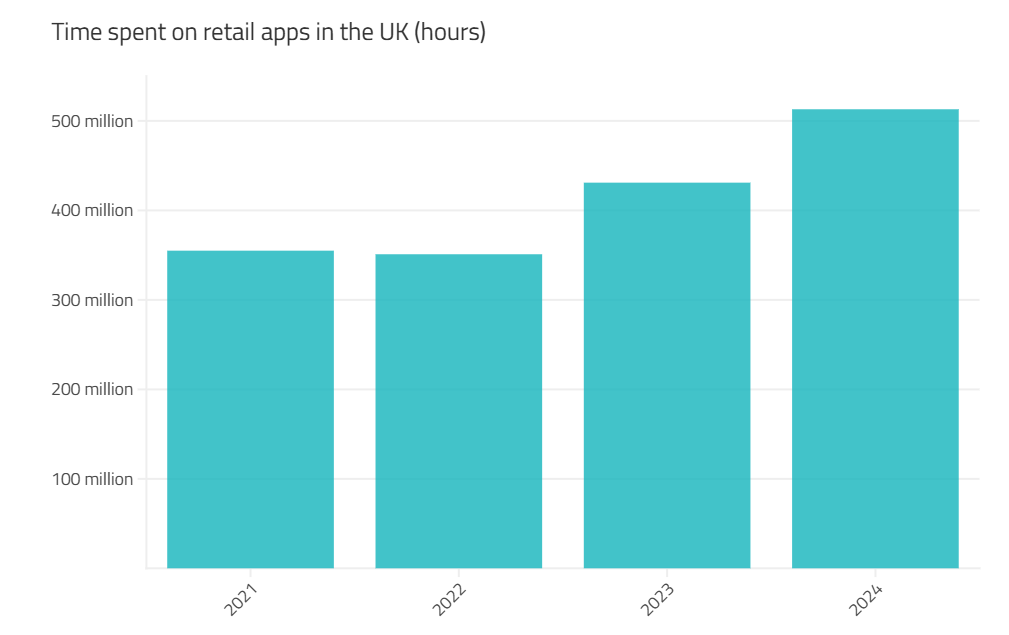
Source: Sensor Tower
Search is how smaller apps are found. Apple states that often search results rest on text relevance (matches in the title, subtitle, keywords, and primary category) and on user behavior such as downloads and ratings. A price comparison app has two jobs: put the right words in the right fields, and make the page turn taps into installs.
The Challenge: A Ready Page, Low Rankings
The app is a UK price comparison tool. Users compare prices across retailers, scan barcodes in a shop, and follow price drops on a wishlist. The page was ready, but the four target keywords sat between #28 and #52, behind apps with years of install history and large review counts. What the app lacked was recent install activity on those keywords.
The team had three doubts: ranks drop right after promotion, the store may view keyword installs as unnatural, and the return on spend would be low. The initial plan was a 14-day campaign, starting five weeks before Black Friday, with rank checks on day 1, day 14, day 21, and day 44.
Campaign Structure: Four Keywords, 14 Days
We chose four keywords that UK shoppers type and the app can answer. Popularity refers to the Apple search popularity score from 5 to 100, which depends on the storefront. Difficulty is a relative label for how hard it is to rank, and both values change over time.
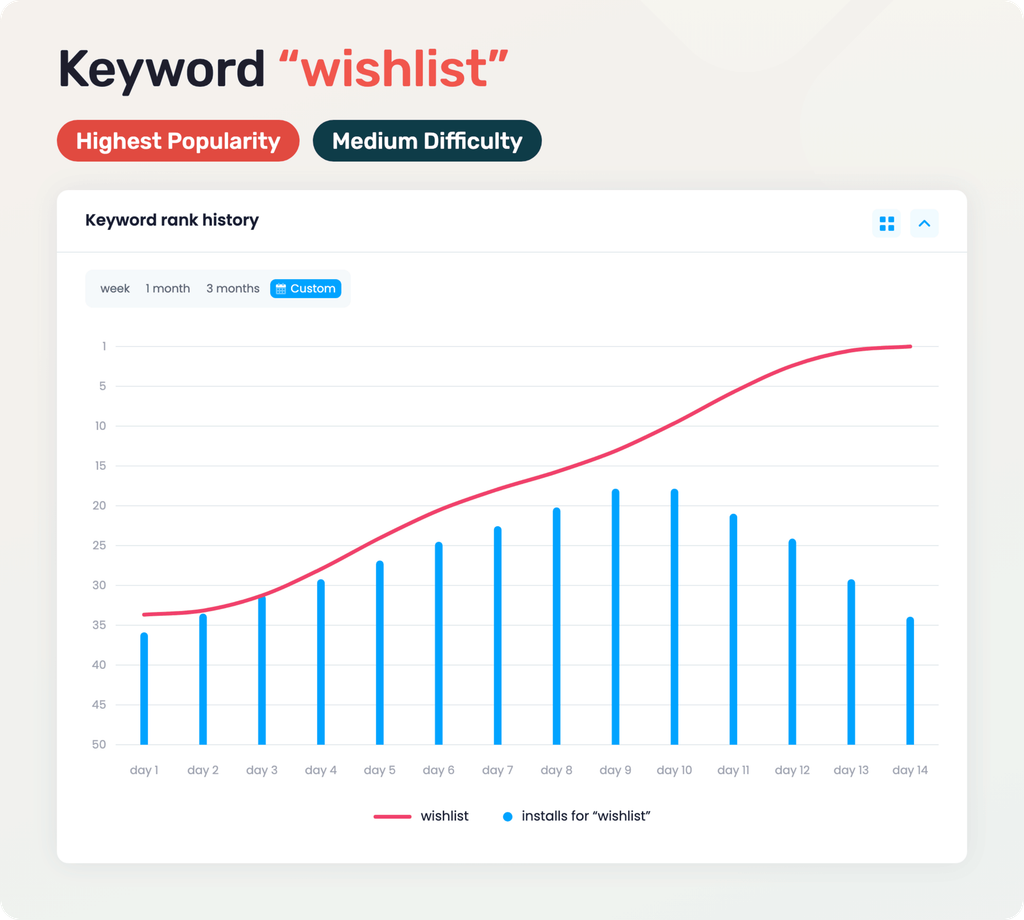
“Wishlist” has the highest popularity of the four, with medium difficulty. The word is in the subtitle, and the app’s wishlist tracks price drops. The app started at #34. Daily installs went from 180 to 410 and back to 205.
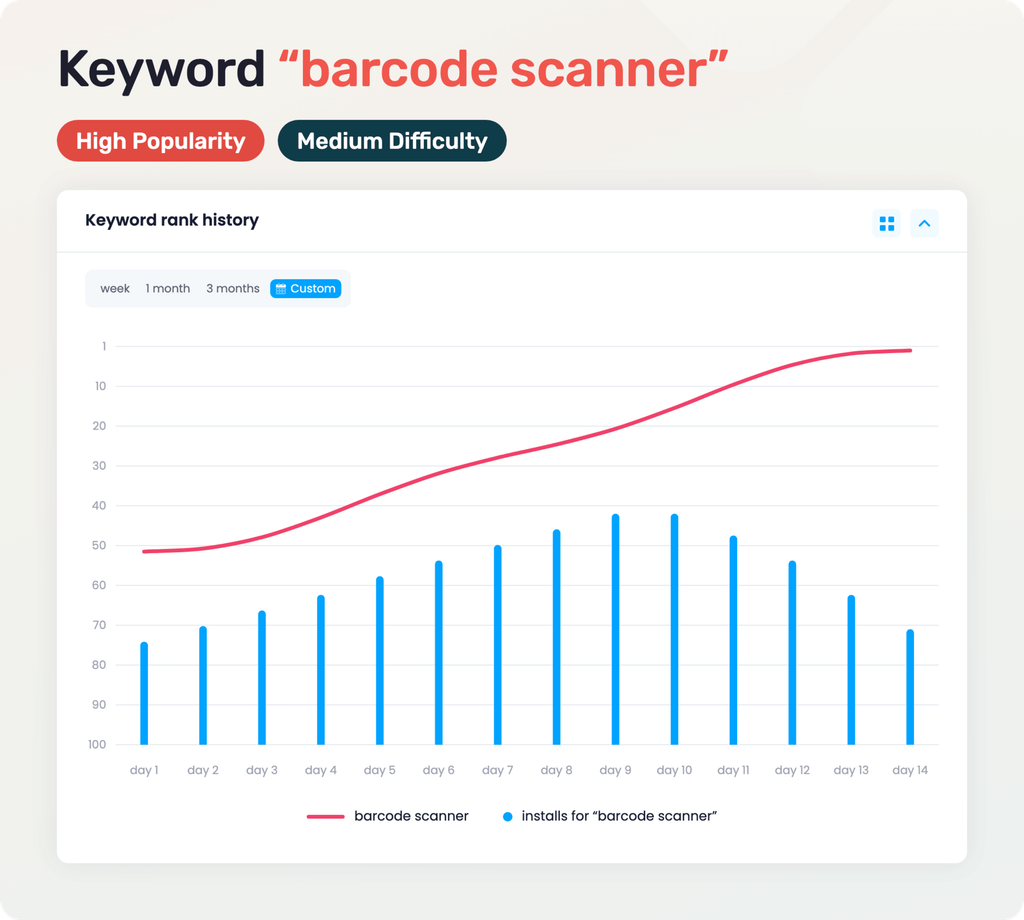
“Barcode scanner” (high popularity, medium difficulty) is also in the subtitle. Many results are general code readers, so the page has to show that this scanner returns prices. The app started at #52. Daily installs went from 165 to 370 and back to 185.
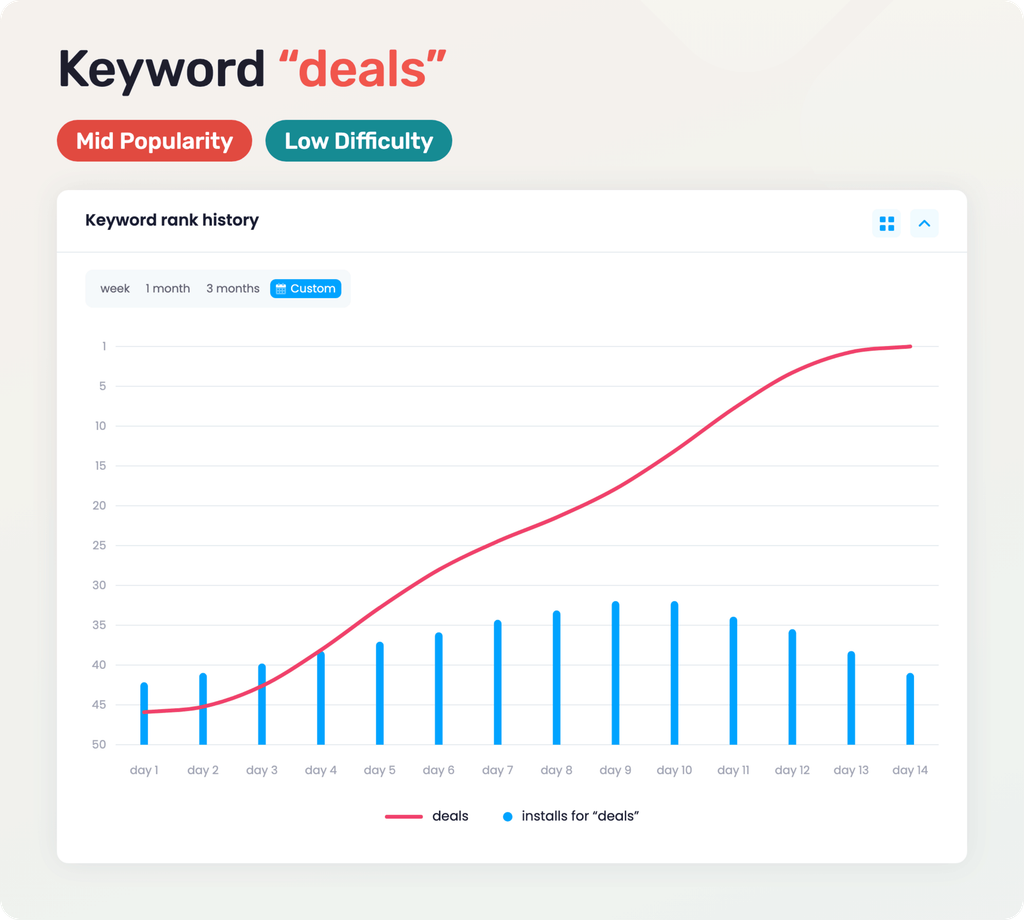
“Deals” (mid popularity, low difficulty) is in the title, and the app shows retailer offers beside every price. The app started at #46. Daily installs went from 100 to 230 and back to 115.
“Discount codes” is a real UK query with low difficulty, but it comes from the keyword field only. We expected it to be the least stable. The app started at #28. Daily installs went from 50 to 115 and back to 60.
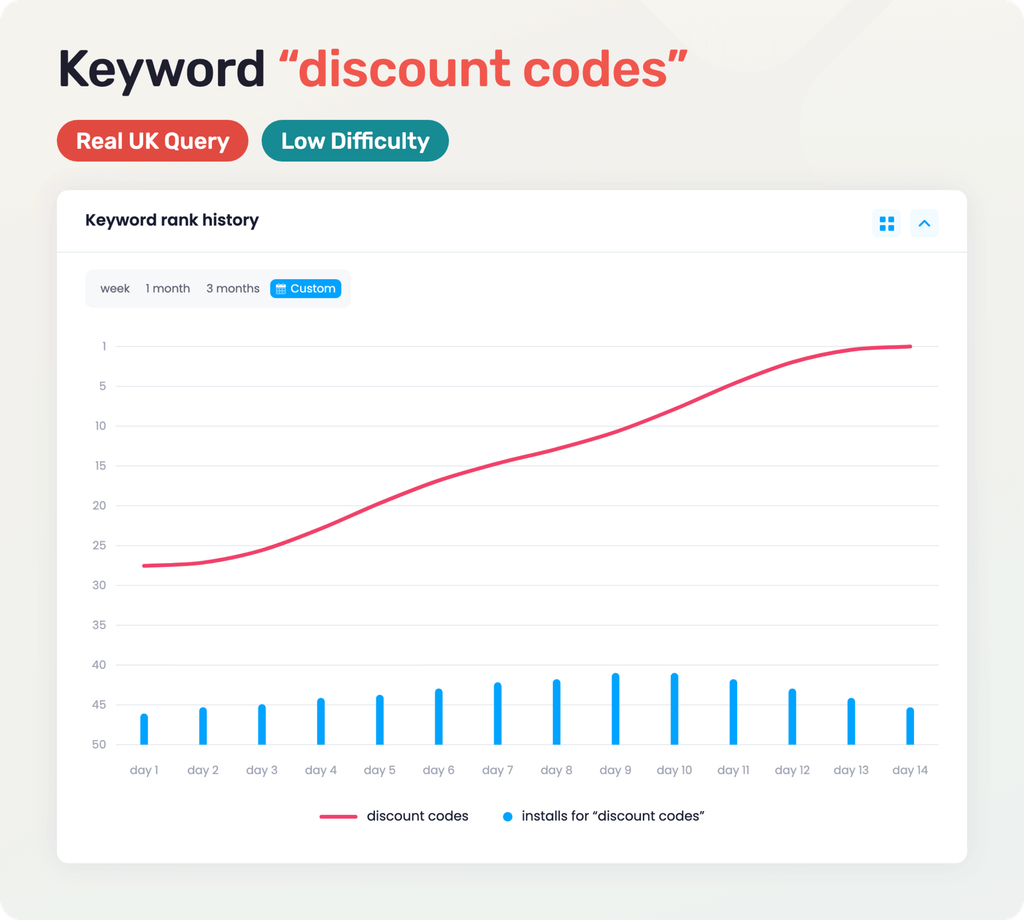
All four keywords followed one volume shape. Installs ramped up through day 9, held at the peak on days 9 and 10, and stepped down over the last four days to about 90%, 80%, 65%, and 50% of each peak.
Results: Ranks 30 Days Later
At the peak, three keywords ranked #1 and “barcode scanner” ranked #2. Thirty days after the last install, “wishlist” stood at #2, “barcode scanner” at #4, “deals” at #2, and “discount codes” at #7. Average rank moved from #40 at the start to #1 at the peak and #4 on day 44. Three keywords lost one or two places from their peak, and all four stayed in the Top 10.
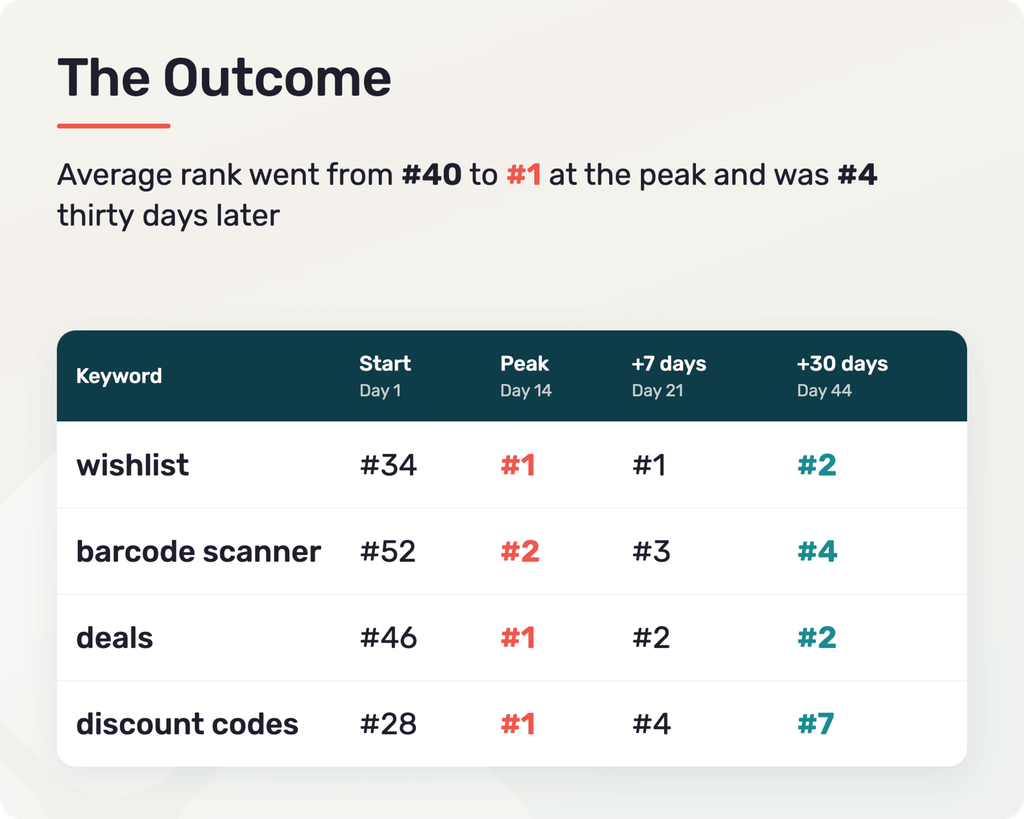
What held, and why: for the three keywords that held, the words sat in the title or subtitle, and the screenshots showed the features the queries describe: a barcode scan and a price history chart. This fits Apple’s own description: text relevance gets an app into the results, and user behavior decides where it ranks.
What did not, and why: “discount codes” lost six places from its peak, and no other keyword lost more than two. The app shows retailer offers but no voucher codes, so searchers had less reason to install once paid orders stopped. Even so, it finished 21 places above its start.
Conclusions and Practical Takeaways
The team initially planned a single 14-day test before Black Friday, worried that ranks would drop right after the campaign ended and waste their budget. The day-44 check settled those doubts. Seeing three keywords hold Top 4 spots thirty days later, along with steady organic installs, proved the return on spend was real. That clear result built trust in the process and turned a one-time test into an ongoing partnership with Keyapp. The client moved to monthly support orders on “wishlist,” “barcode scanner,” and “deals,” and now plans to test new keywords, try category promotion, and enter new store regions.
Four points apply to any app in a crowded niche:
- Judge a campaign by the rank thirty days after the last install, not at the peak, and review the keywords that slipped as openly as those that held.
- Match each keyword to the page, because title or subtitle placement and screenshots that answer the query decide whether a rank stays.
- Set volume by popularity and difficulty: the two most popular keywords took 69% of all installs.
- End a campaign with a gradual step down, not a sudden stop.
Keyapp.top offers keyword installs across 200+ regions, letting teams match volume to each query and build steady organic rankings in local markets. If your app has a stuck rankings, the Keyapp.top team can review your positions and build a plan with you.
Get in touch with our support team to discuss your campaign!