How keyword installs took a coloring game from #72 to #4 on Google Play
- Overview:
- Canadian Market for Drawing and Coloring Games
- The Challenge: Good App Page, Low Rankings
- Campaign Structure: Six Keywords by Search Volume
- Results
- Conclusions and Practical Takeaways
A drawing and coloring game for adults had a solid Google Play listing page and a clear audience, yet its two largest keywords sat at #72 and #67 in Canada. Over 28 days we ran daily keyword installs on six keywords grouped by search volume, with category installs running alongside. The average rank across the set moved from 46 to 3, and all six keywords reached the Top 5. A week after campaigns ended, every keyword was still within one place of its final position.
This case study documents how the promotion was built, why the order of the keywords mattered as much as the number of installs, and what other apps in the niche can take from it.
Canadian Market for Drawing and Coloring Games
In Canada, a Top 10 position for a mid-volume query puts an app in front of people who are already looking for it. The wider market adds pressure: mobile game downloads fell 7.2% to 50.4 billion in 2025 and in-app purchase revenue grew only 1.3%, per Sensor Tower’s State of Gaming 2026 as summarized by GameDev Reports. Puzzle, the category where Happy Color sits on Google Play, did better: casual puzzle downloads rose 9.9% to 7.7 billion and revenue 7.6% to $8.2 billion, per AppMagic.
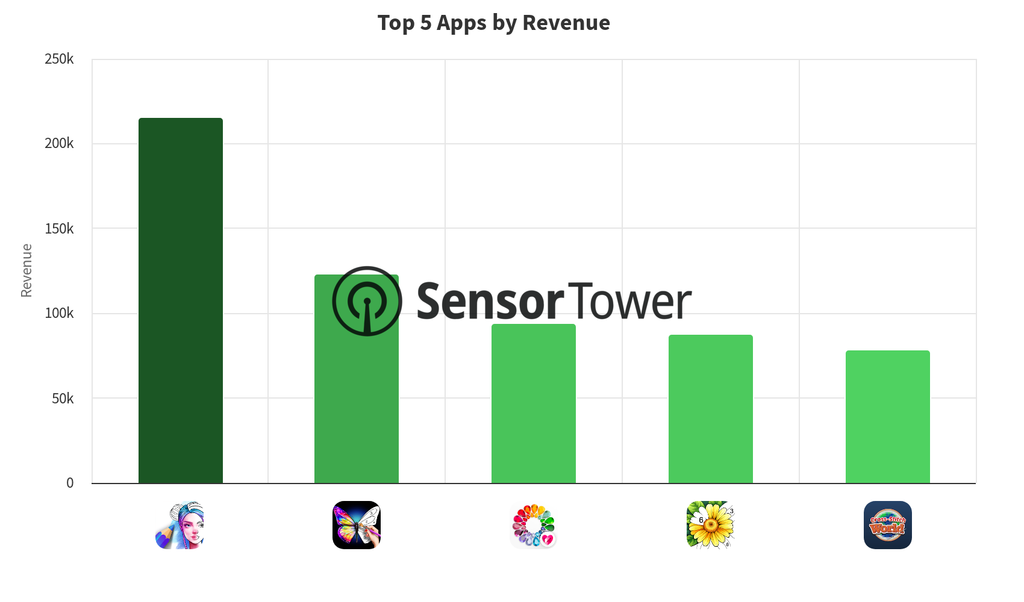
Inside the niche, the field is crowded. Sensor Tower’s Q4 2025 ranking of the top drawing and coloring apps on Android in the US shows Color Pop reaching about 65,000 weekly downloads and $21,000 in weekly revenue by the last week of the year. We use the US as the nearest reference, as no Canadian ranking was available. Happy Color lists 100M+ downloads on Google Play and about 3.9 million reviews, and its English (Canada) page is titled “Colour by Number”. Canadian players type both “coloring” and “colouring”, and the storefront treats them as separate queries.
The Challenge: Good App Page, Low Rankings
Our client’s app is a relaxing drawing and coloring game for adults and older teens, with color by number pictures, mandala pages and a sketch canvas with brushes and layers. Sessions are short, usually five to ten minutes.
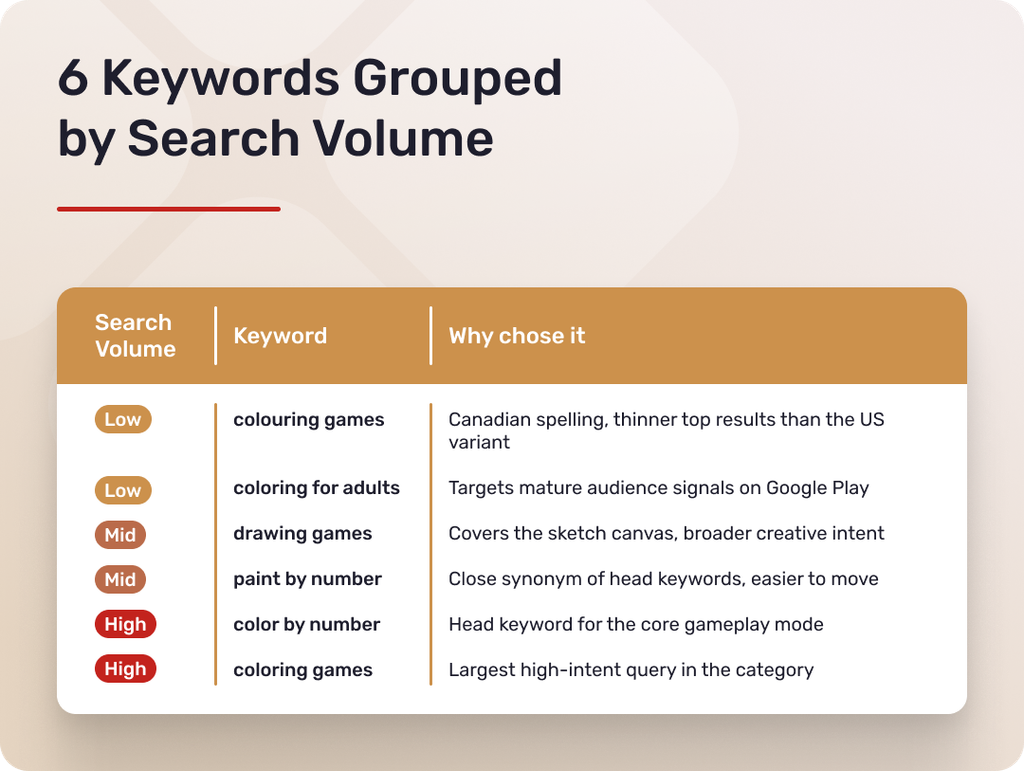
The app page was solid. The title and short description named the core modes, the screenshots showed finished artworks instead of empty menus, and the description covered every main keyword cluster. The rankings told another story. The two largest keywords, “coloring games” and “color by number”, sat at #72 and #67. The other four hovered between #24 and #41. None of these positions could bring the app in front of searching users.
The app had relevance but no install history for Google Play to weigh. Google’s documentation says search results weigh relevance, app quality and user feedback, including engagement, and AppTweak notes that Google treats the number, frequency and recency of downloads as a strong indicator of relevance. The goal was not to rebuild the page but to give the store recent install activity to match it against.
Campaign Structure: Six Keywords by Search Volume
We chose six keywords, two per search volume level, that match adult and teen intent, appear in Google Play suggestions for Canada and already had the app ranking in the top 75. Each keyword received installs daily for 28 days, as two consecutive 14-day orders, on a smooth curve with no bursts.
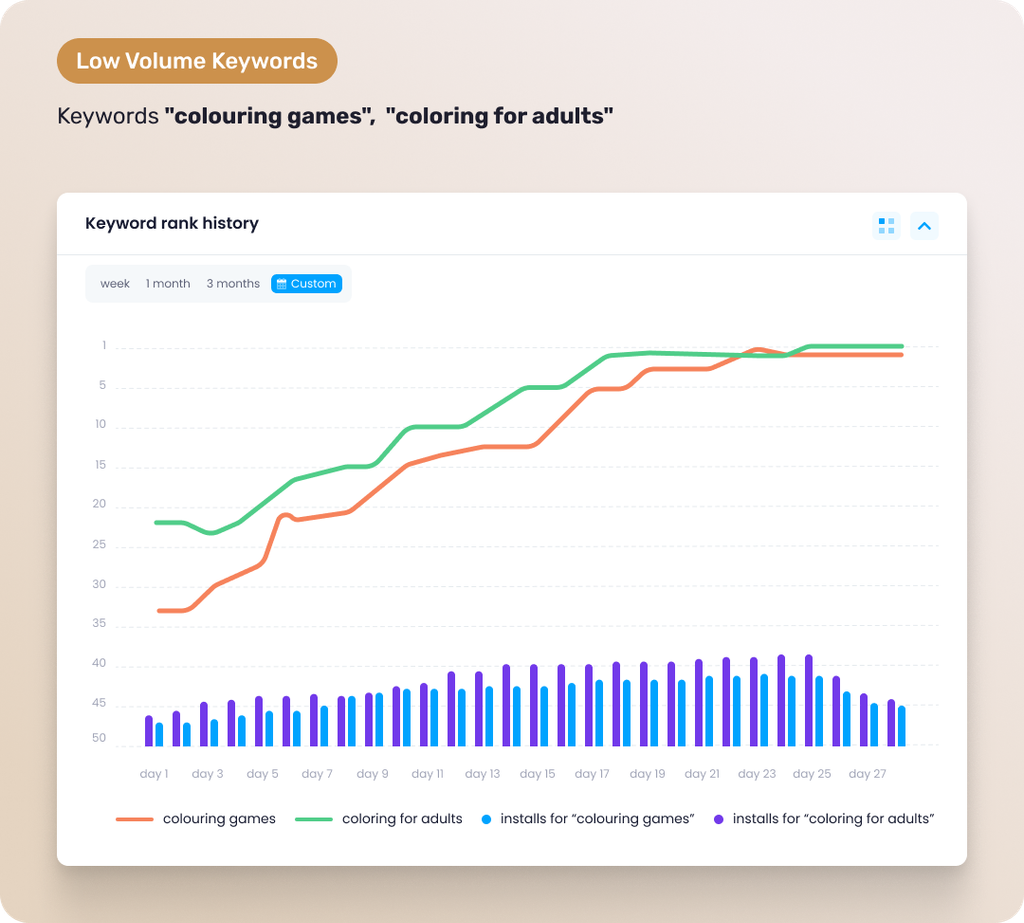
The low-volume keywords were “colouring games” and “coloring for adults”. They need the least volume to move. “Colouring games” is the Canadian spelling, with thinner top results than the US variant. “Coloring for adults” tells Google Play which half of the category the app belongs to: calm creative play for adults, not kids’ coloring books. Installs started at 18 to 22 a day, reached 44 to 60 by day 14 and held near 50 to 66.
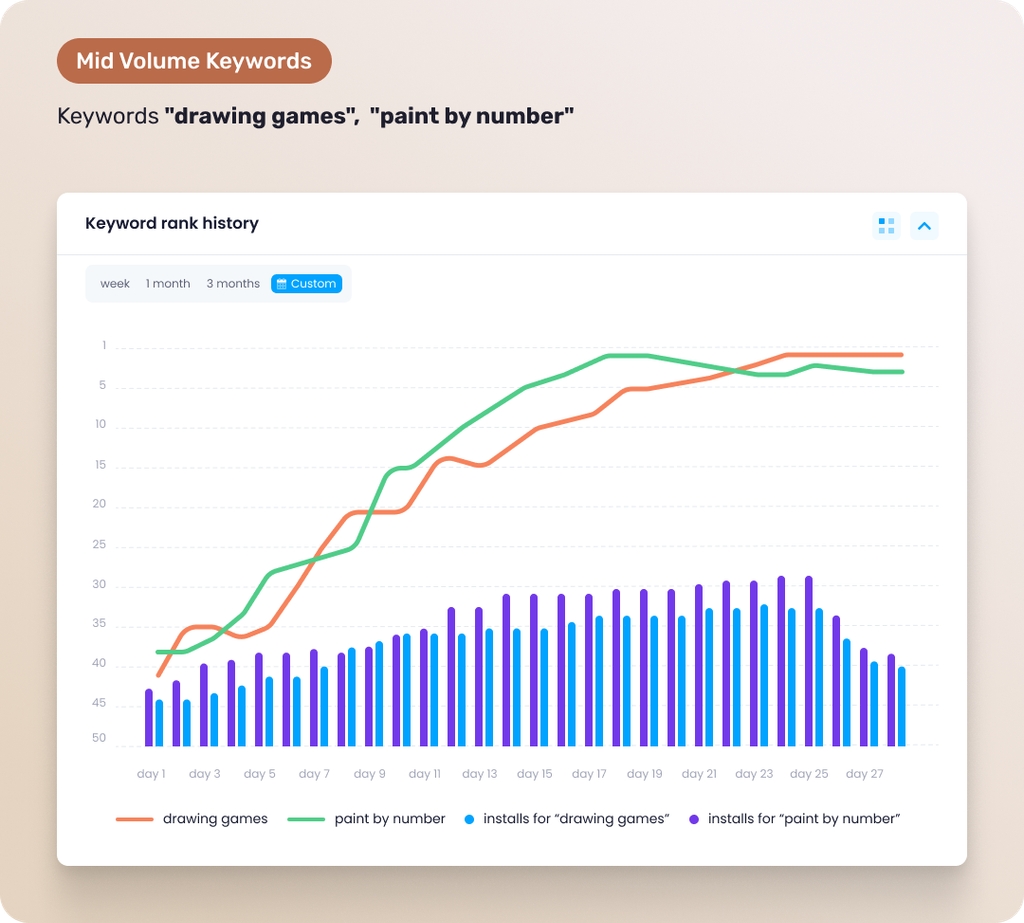
The mid-volume keywords were “drawing games”, which covers the sketch canvas, and “paint by number”, a close synonym of “color by number” that is easier to move. Installs started at 26 to 38 a day, reached 76 to 112 by day 14 and 92 to 126 by day 25. “Paint by number” received the heavier volume, because a strong position there lifts the app’s standing for its larger synonym.
The high-volume keywords, “color by number” and “coloring games”, are the largest queries in the category, held by apps with 100M+ downloads. Their volume stayed moderate for two weeks, from 40 and 42 installs a day to 90 and 96, then rose to 236 and 250 a day by day 25. By then the app already ranked well on four related keywords, so the climb was more efficient than a cold start.
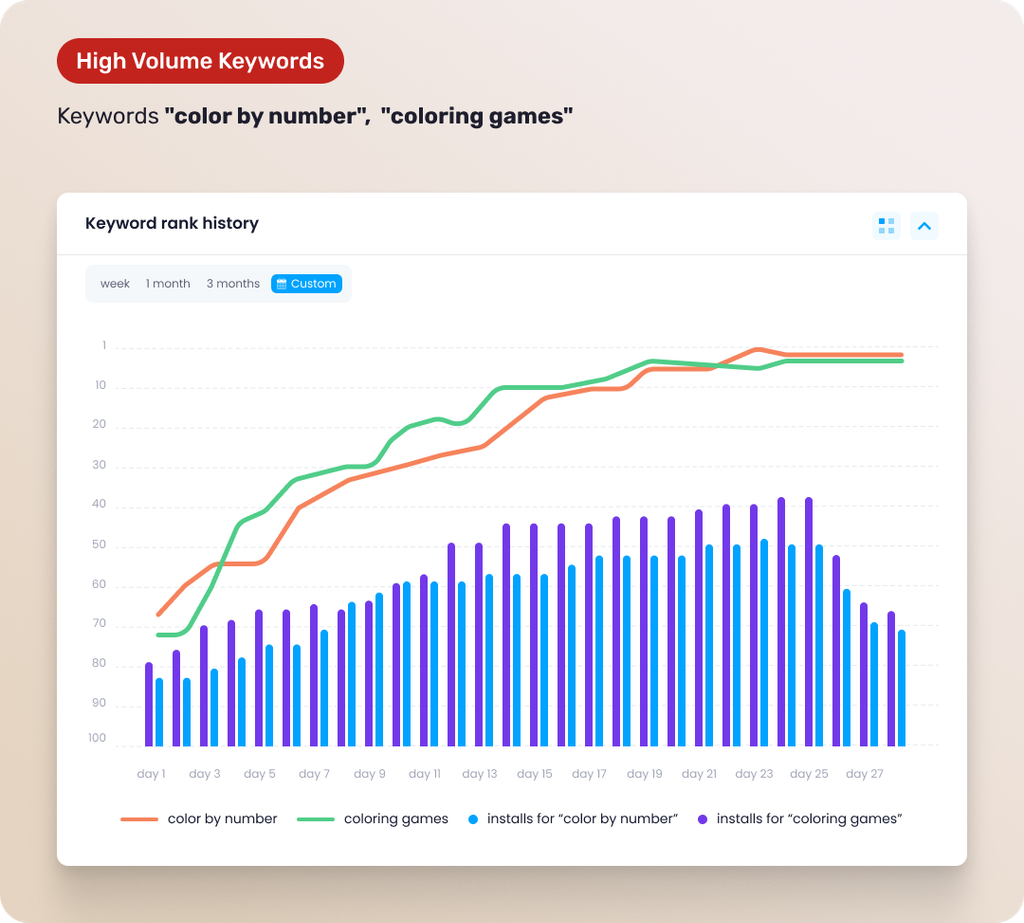
In the last three days, volume stepped down to about 85%, 70% and 55% of each keyword’s peak instead of stopping at full speed. Weekly totals grew from 1,775 installs in week 1 to 2,883, 4,141 and 4,807 in week 4. A curve like this resembles organic growth and gives positions a softer landing.
Alongside keyword installs, we ran category installs for all 28 days, aimed at Canada’s Top Free Casual Games chart. People find apps through search and through browsing, and Google lists both among the ways to discover apps, so a higher category position reaches users who were not typing a query. Category installs also kept the overall install pattern in line with the growing keyword volumes. Because the two flows ran together, this case cannot isolate their separate effects.
Results
By day 28 all six keywords had reached the Top 5, and the average rank across the set moved from 46 to 3, a gain of 43 places. We checked positions again on day 35, one week after delivery ended.
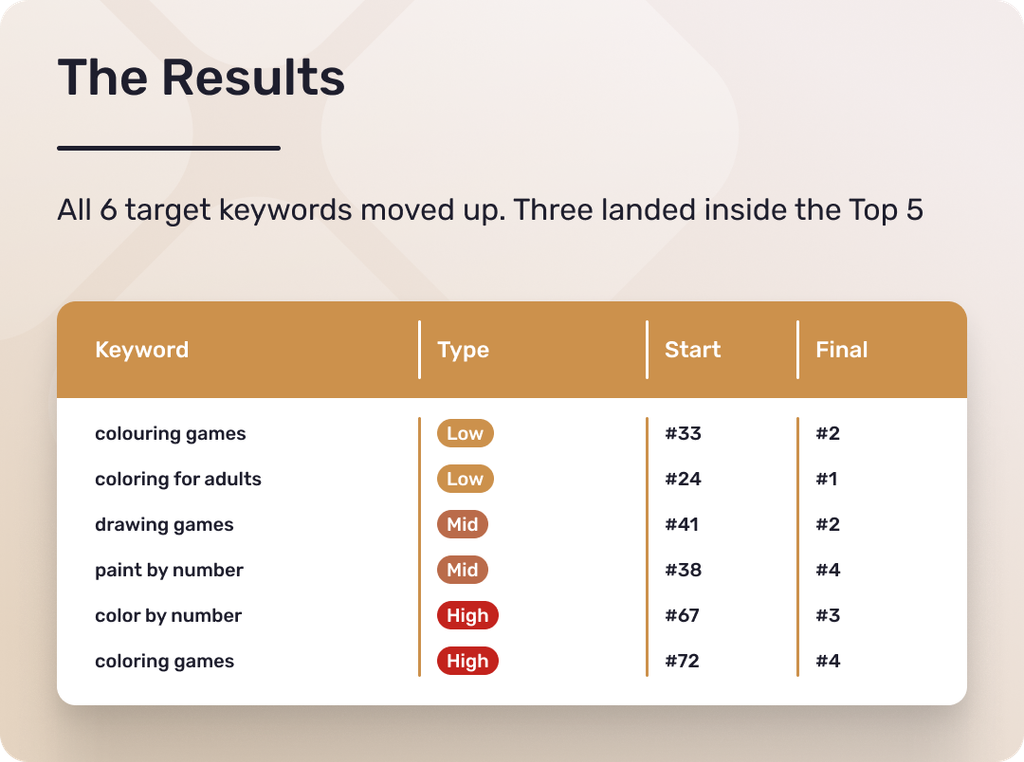
The low-volume keywords moved first. “Colouring games” entered the Top 10 on day 8 at modest volume, and “coloring for adults” finished at #1. “Paint by number” crossed into the Top 10 on day 13 and held #4, and “drawing games” held #2. The largest keywords produced the biggest gains: “color by number” went from #67 to #3 and “coloring games” from #72 to #4.
A week after delivery ended, four keywords had not moved and two had lost a single place, to #4 and #5. Holding Top 5 positions against apps with 100M+ downloads would still call for a maintenance phase.
Conclusions and Practical Takeaways
Four observations from this campaign apply to any app in a crowded niche.
- Audience-defining keywords come first. “Coloring for adults” is not the biggest query, but it tells Google Play which half of the category the app belongs to, and the mid-volume keywords that followed moved well on modest volume.
- Local spelling is a real entry point. “Colouring games” needed 1,068 installs to go from #33 to #2, against 3,418 for “coloring games” to go from #72 to #4. A local spelling variant is worth tracking as its own keyword.
- A close synonym works as a bridge. “Paint by number” reached the Top 10 on day 13, and “color by number” reached the Top 5 by week 4. When the largest keyword looks out of reach, start with its closest synonym.
- A soft ending protects the result. All six keywords stayed within one place a week after delivery stopped.
To sum up, a solid app page is a prerequisite, not a substitute: keyword installs give Google Play recent activity to weigh, and the metadata gives it something to match. Keyapp.top runs keyword installs for Google Play in 200+ regions, so the same plan can run in several markets with local keywords and spelling variants. Keyword installs and category installs can be combined, depending on the store and country. A sensible start is small: one market, two or three keywords, a two-week ramp, a gentle step down and a rank check a week later.
If your app has a good page but stuck keyword positions, the Keyapp.top team can help. We review your current positions, assess your category competition and build a plan around your growth goals.
Get in touch with our support team to discuss your campaign!